
Below are simple steps on how to flash Spreadtrum phones like feature phones with Aladdin software. Aladdin is a useful tool to read phone information and also write flash files. You can read passwords and reset locks also, but today we will show you how to simply flash a phone.
Aladdin 1.34 Crack Software Free Download
How to Flash Spreadtrum
To flash a Spreadtrum phone, you will need the following:
- The phone should have at least 30% charge.
- The flash file for the exact phone model.
- USB cable
- PC with Aladdin already installed.
- Spreadtrum Drivers should be installed.
Steps to Flash SpreadTrum Phones:
Follow these steps on how to flash your Spreadtrum or feature phone.
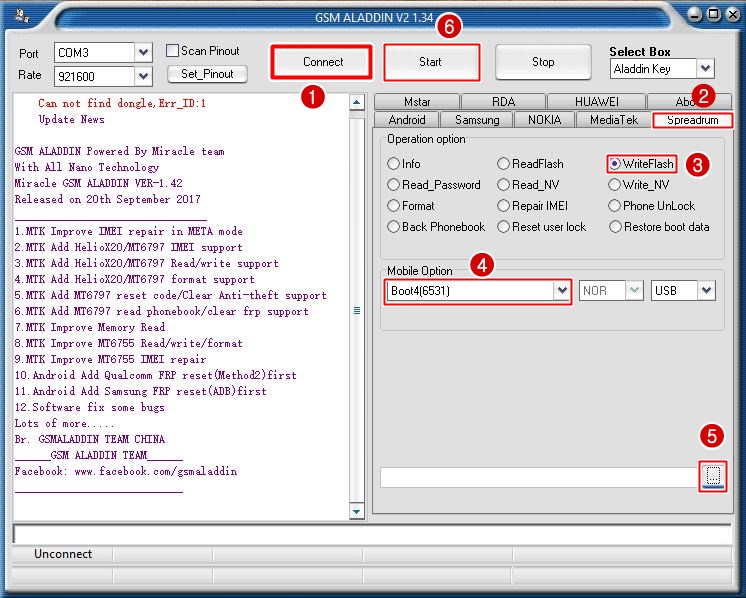
- Launch the Aladdin software
- Click the “Connect” Button
- Click the Spreadtrum tab
- Select write flash
- In the Mobile option menu, select the CPU type of your phone. If you are not sure, you can Google for the phone specs and find its CPU type.
- Then, click on the folder icon and navigate to where you have saved the flash file and select it.
- Click start
- With the phone switched OFF, hold the boot key and plug in the USB cable.
- Once the computer detects your phone and the flashing process begins, release the boot key and wait for the process to finish.
- Don’t disconnect the cable while flashing it might brick your phone.
- If successfully flashed, then just disconnect and power ON the phone.
- Done!!
Download Aladdin Flashing tool here!!

Tech GURU



4 Comments on “How to Flash SpreadTrum Phones with Aladdin”