Below are simple instructions on how to register Borneo schematics and activate your account. Borneo is NOT FREE, so you must have purchased its activation code.
How to Register Borneo Schematics
- Buy this product on our website or WhatsApp us HERE for more info and package prices.
As soon as your order is completed, you will receive an activation code to your email. - Download Borneo Schematics setup
- Install the setup to Drive C
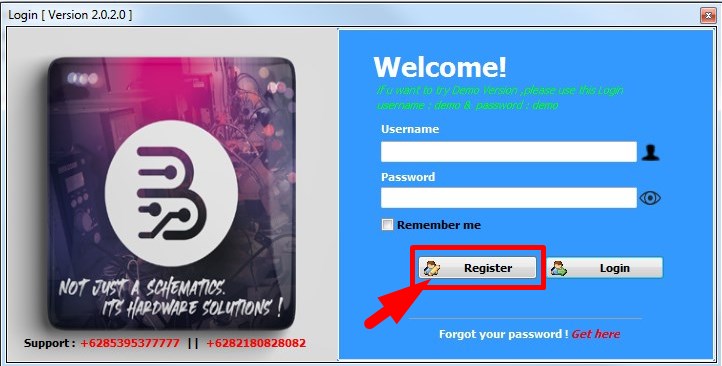
- Start the .exe file from C/Borneoschematic
- Press Register
- Copy and paste the activation code sent to you.
Supported OS:
- 7 (not all features will work), 8 (partially compatible), 10, 11 x64
Package Content:
- Activation Code for Borneo Schematics
The product is digital – no packaging!
When we confirm your payment and process your order, we will send your activation code and detailed instructions to you.
Borneo Schematics is a must-have tool for anyone dealing with phone hardware repair. Created by the Borneo Flasher Indonesia team, which has experience in the field of cellphone technicians and cellphone technician training since 2001.
Very detailed and easy to apply in the daily repair of damaged smartphones.
This online hardware scheme viewer allows you to use:
- PCB bitmaps
- hardware repair solutions
- official PDF schematics
One user account can be used on 2 PCs simultaneously. Access valid for 1 year.
When your current activation expires, you can renew your access with any of the double-user activations:
Cannot be extended with single-user activations.