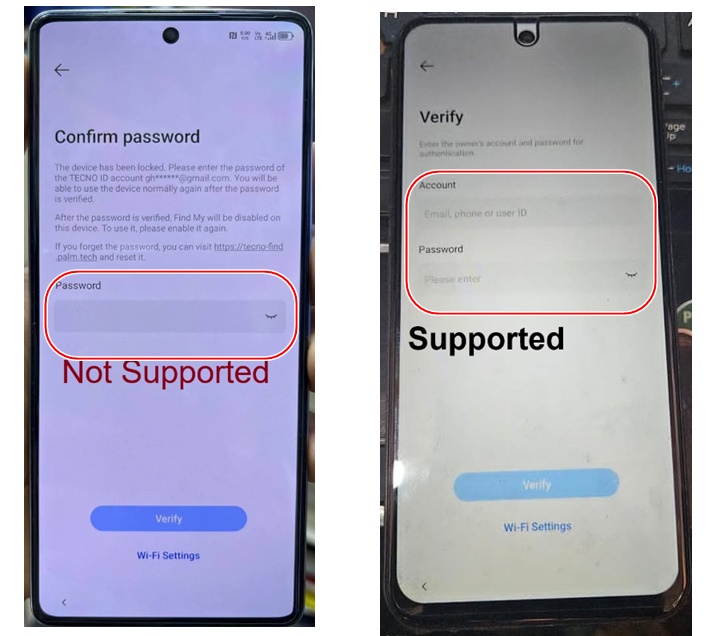
Remove Tecno and INFINIX IDs without the server using DFT pro and the instructions below. This method supports if the phone asks for the Email and Password. If only the password is shown, it’s not supported; click here for that solution.
ALTERNATIVE SERVER SOLUTION
DFT Pro Tool Rent Available at 3$
First: MediaTek Devices
1- Enter Meta Mode
Power off the phone completely. •
Open DFT PRO. •
Navigate to: •
MediaTek → Meta Mode Reset FRP (Infinix / Tecno / iTel)
Connect the phone and wait until the tool detects it and successfully enables ADB •
Mode.
2- Open Settings
Go to: •
APK Manager → All APP
Search for: •
Settings
Right-click on it and select: •
Start Application
The Settings screen will open directly on the phone. •
3- Enable Developer Options
Watch the ADB activation video here. •
Enable: •
Developer Options
Then go to: •
OEM Unlock
and enable it.
The device will ask you to enter an account. •
4- Sign In With a New Account
Sign in using a completely new Infinix ID or Tecno ID account that you can access. •
5- Perform Factory Reset
After signing in successfully, perform: •
Factory Reset
from within Settings.
6- Activate the Device
After the device restarts: •
Connect to a Wi-Fi network. o
When prompted, enter the credentials of the new account you previously o
added.
The device will be activated successfully and permanently linked to the new account.
Second: SPD (Unisoc) Devices
SPD-powered devices follow the same principle and procedure, with only the initial tool being
different for enabling the exploit.
1- Enable ADB
Connect the phone. •
Enable ADB Mode using Chimera first. •
2- Open Settings
After ADB has been enabled successfully, switch directly to DFT PRO. •
Go to: •
APK Manager
Search for: •
Settings
Open it using the same method explained above. •
3- Continue the Remaining Steps
Continue with the following steps: •
Sign in with the new account. o
Disable Find My. o
Perform a Factory Reset from inside the device. o
Exactly as explained for MediaTek devices

Tech GURU