Many factors can cause CM2 Dongle misconfiguration. There is normally a software conflict with Virtual Here. Do not run Virtual Here at the same time with Infinity to avoid bad result.
Also, it may be a software conflict with TeamViewer, Anydesk, Ultraviewer, and Ammyy Admin, which could possibly cause the issue so it’s recommended to close those programs and restart the PC.
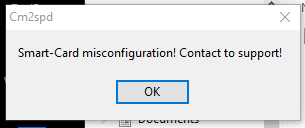
How to Fix CM2 Dongle Misconfiguration
METHOD 1
How to Stop Software conflict with TeamViewer, Anydesk, Ultraviewer, Ammyy Admin
Close application and also stop Services:
1. Right click on This PC => Manage => Services and Applications => Services => Double click to service
2. Click the [ Stop ] button
3. Select Manual and click on [ OK ]
In case of future problems please contact to support
METHOD 2
File Name: CM2 Dongle Fault.bin Error Solution File
- First Of All, Open the Cardreader_Ferain_FT2K Folder
- Select Your Bit Version Folder
- Open ( r5smcs.cat) File And Click ( View Signature) And Click ( View Certificate)
- And Click Install Certificate And Ok
- After This Open Dongle Manager And Update Dongle Firmware
- All Ok
Compatibility: The tool runs perfectly on Windows XP, Windows Vista, Windows 7, Windows 8, Windows 8.1, and Windows 10 (32-bit and 64-bit).
Take a Backup: If you are willing to try the above tool, then please take a backup of your data from your Android Smartphone or Tablet. Flashing any Firmware or recovery may brick the device.
Credits: CM2 Fixed “Dongle Misconfiguration” is created and distributed by the developer. So, full credits go to the developer for sharing the tool for free.
Read also:
- TSM Tool Activation | 1-3-12-24 Months License
- TR Tools PRO Activation 1 Year License
- Fenris FRP Tool Credits for Samsung

Tech GURU