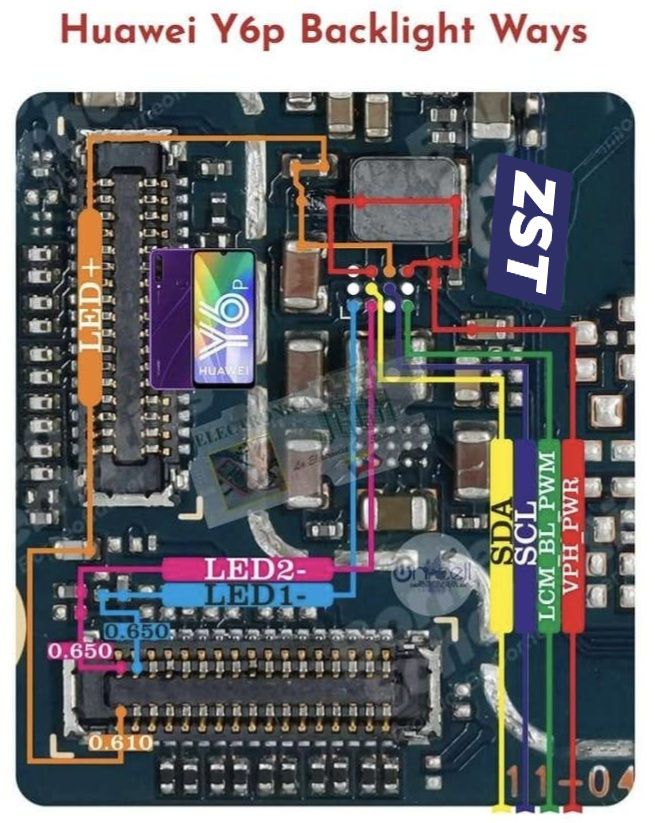
Huawei Y6p Backlight schematic ways to fix backlight hardware issues. Here’s a practical backlight fix guide for the Huawei Y6p. This model commonly loses backlight due to display or power-line issues.
Huawei Y6p Backlight Ways
Read also:
Samsung Galaxy A20s Display Light Solution | SM-A207F
First: Confirm it’s a backlight problem
Your backlight is likely faulty if:
- Phone powers on (you hear sounds/vibration)
- The screen is very dark, but the image is visible under a torch
- Touch still works
If the screen is totally dead (no image even with light), this is not a backlight issue.
Common causes (Huawei Y6p)
- Damaged LCD backlight LEDs (most common)
- Loose or oxidized display connector
- Blown backlight filter/coil (after liquid or power surge)
- Backlight power IC failure (rare)
Step-by-step fixes (start simple)
1️⃣ Reseat the screen connector (Easy)
Tools: screwdriver, plastic pry tool
- Power OFF the phone
- Open the back cover
- Disconnect battery
- Remove the metal shield over the display connector
- Unplug display flex → clean gently → reconnect firmly
- Reassemble and test
👉 If the backlight returns, the connector was the issue.
2️⃣ Replace the LCD (Most successful fix)
The Y6p LCD backlight is built into the screen, not separately replaceable.
✔️ If reseating fails → replace the full LCD
✔️ Always test the new screen before sealing
Symptoms that confirm LCD backlight damage:
- The screen went dark after dropping
- Flickers before going black
- Works briefly when pressed
3️⃣ Check backlight line (Technician-level)
If the new LCD still has no backlight:
Using a multimeter:
- Check backlight filter (BL_F / LCM filter)
- Check the backlight coil
- Check for shorts to ground on the backlight line
🔧 Typical repair:
- Replace the burned filter or coil
- Reflow backlight IC (advanced)
⚠️ This requires board-level skills.
What NOT to do
❌ Don’t keep increasing brightness (won’t fix hardware)
❌ Don’t use force on the connector
❌ Don’t apply heat without experience (risk CPU damage)
Quick diagnosis summary
| Symptom | Fix |
|---|---|
| Dark screen, image visible | Replace LCD |
| No image at all | Screen or motherboard |
| New screen still dark | Board backlight circuit |