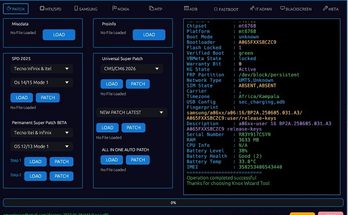
EFT Pro Activation is a standalone tool for servicing Samsung, Huawei, iPhone, and many other devices WITHOUT ANY DONGLE!
Read also: (NEW) Pandora Tool Latest Update Download
WHATSAPP ME HERE FOR UPDATED ACTIVATION PRICES
+254712969574
EFT PRO Activation Packages
- 1-YEAR ACTIVATION
- 6 MONTHS ACTIVATION
- 3 MONTHS ACTIVATION
- 1 MONTH ACTIVATION
How to Activate
Step 1. Download the EFT Pro Tool software
Step 2. Launch the software. Choose the ‘Account’ option and press ‘Register’ to register your account
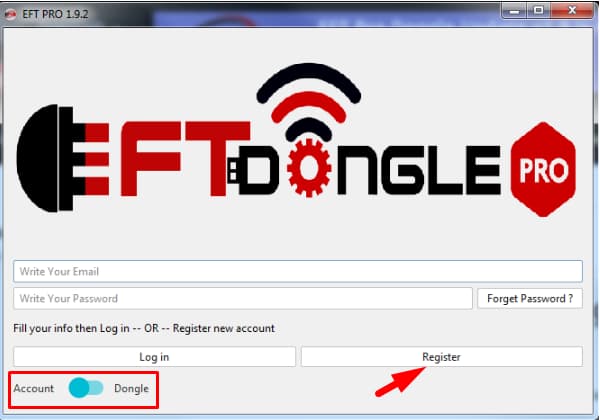
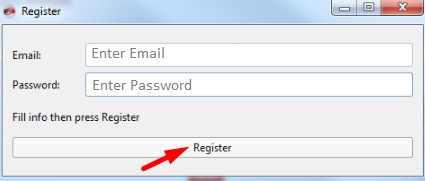
Step 3: Type in your email and password. Press ‘Register’
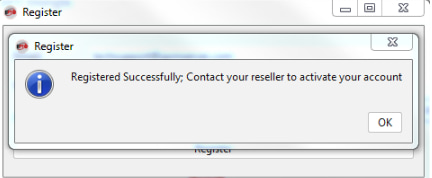
Step 4: Press ‘OK’
Step 5. Buy this activation
While placing the order, indicate the email that you used for your account registration
After your order is completed successfully, we will inform you about it via email.
Step 6. Now, you can log into your account.
Enter your registered email and password. Launch the EFT Pro Tool software, click ‘Account’ and then click ‘Login’
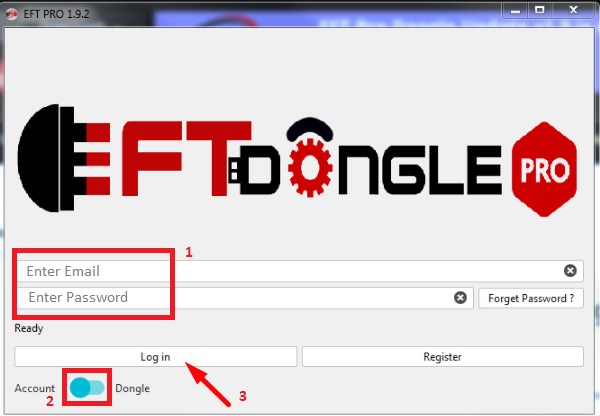
DONE!
Important!
This activation can be used on 2 PCs only.
1 PC can be changed once in 30 days.
If you try to use this activation on more than 2 PCs or share it for remote access, software access will be blocked.
WHATSAPP ME HERE FOR UPDATED ACTIVATION PRICES
+254712969574
Features:
ADB Mode
- Backup contacts (ADB)
- Backup data (ADB)
- Dump ROM (ADB Root)
- Enable Hidden Languages (ADB Root)
- Read Info (ADB)
- Reboot (ADB)
- Remove ScreenLock (ADBROOT)
- Remove ScreenLock (ADB)
- Remove Security Log Notification (ADB ROOT)
- Remove Security Log Notification (ADB)
- Reset FRP (ADB)
- Restore data (ADB)
APK MANAGER
- Install APKs (ADB)
- Remove apps (ADB)
- Setup More Locale (ADB)
iPhone
Unlimited and Free Bypass iCloud Untethered (without credits)
Added new interface for Apple features, including the following options:
- Bypass iCloud for GSM & MEID with the following features:
- MEID without Network
- No MEID with Network
- MEID = CDMA
- No MEID = Gsm
Supported models:
iOS 14.X
- iPhone 6S
- iPhone 6S Plus
- iPhone SE
iOS 13. X
- iPhone 6S
- iPhone 6S PLUS
- iPhone 7
- iPhone 7 PLUS
- iPhone 8
- iPhone 8 PLUS
- iPhone X
- Some iPad
iOS 12. X
- iPhone 6G
- iPhone 6 Plus
Working features after Bypass:
- Untethered
- 3G/4G/LTE
- iMessage
- FaceTime
- iCloud Sign In
- Notifications
- Calls/SMS
- CARRIER [GSM]
- MEID [NO CALL]
- Fingerprint
- Face ID
- Read info from iDevices
Requirements for Bypass iCloud at Hello Screen (in Normal Mode):
- JailBreak your iOS device
- If your Device has MEID enabled:
- The bypass will be without GSM Network
- Put SIM card with PIN into the device
- Connect it to the PC using a USB cable
- Wait until the device appears on the PC, then press Start
iPhone / iPad
- Bypass MDM without jailbreak
- Erase iPhone iOS (12,13, and 14)
- Erase iPhone A11 (iPhone 8/8+/X)
- Backup / Restore iPhone Passcode
- Patch USB
- Bypass iCloud GSM (with signal / supported iOS 12.3 up to iOS 14.5.1)
- Bypass iCloud MEID (no signal / supported up to iOS 14.8.1)
- Bypass iCloud MEID (no signal / supported up to iOS 14.8.1)
- Fix Backup / Restore iPhone Passcode (iOS 12.x)
- Bypass Carrier SIM Lock Gsm / MEID (Normal Mode)
- Bypass MDM for iPhone and iPad (method 2)
- Boot / Backup / Restore Passcode (iOS 15.X)
- Fix missing ic-info.sisv file (iOS 15.X)
- Fix drivers for Passcode (iOS 15.X)
Bypass iCloud on Hello Screen (iOS 15) for iPhone 6s/7/7+/8/8+/X (without network).
Boot for iPhone 8/8+ iOS 16 (Hello Screen).
Boot for the following iPad models:
- iPad5, 1-j96ap – iPad mini 4 (WiFi)
- iPad5, 2-j97ap – iPad mini 4 (Cellular)
- iPad5, 3-j81ap – iPad Air 2 (WiFi)
- iPad5, 4-j82ap – iPad Air 2 (Cellular)
- iPad6, 11-j71sap – iPad (5th generation) (WiFi)
- iPad6, 11-j71tap – iPad (5th generation) (Cellular)
- iPad6, 12-j72sap – iPad (5th generation) (WiFi)
- iPad6, 12-j72tap – iPad (5th generation) (Cellular
- iPad7, 1-j120ap – iPad Pro (12.9-inch) (2nd generation) (WiFi)
- iPad7, 2-j121ap – iPad Pro (12.9-inch) (2nd generation) (Cellular)
- iPad7, 3-j207ap – iPad Pro (10.5-inch) (WiFi)
- iPad7, 4-j208ap – iPad Pro (10.5-inch) (Cellular)
- iPad7, 5-j71bap – iPad (6th generation) (WiFi)
- iPad7, 6-j72bap – iPad (6th generation) (Cellular)
- iPad7, 11-j171ap – iPad (7th generation) (WiFi)
- iPad7, 12-j172ap – iPad (7th generation) (Cellular)
- Boot for Passcode/Hello iOS 15.x/16.x
- Mount iOS 15.x (iPad/iPhone) Mth1
- Mount iOS 15.x (iPad/iPhone) Mth2
- Mount iOS 16.x (iPad/iPhone) (Hello Screen)
- Boot Passcode/Hello From Folder
- IPWNDER tool supported
SAMSUNG
Flash
- Flash Firmware (Download Mode)
- Flash multiple images (Download Mode)
- Flash patched EFT files (Download Mode)
- Read PIT (Download Mode)
IMEI-CERT
- Read Cert (ADB ROOT)
- Restore Original (ADB ROOT)
- Set SIM Count (ADB Root)
- Write Cert (ADB Root)
- Write IMEI (ADB Root)
EFS-SECURITY
- Backup EFS (ADB Root)
- Backup Security (ADB Root)
- Downgrade modem [Write combo modem] (ADB Root)
- Flash ENG EFS [Fix EFS errors] (Download Model)
- Reset EFS (ADB Root)
- Reset Security (ADB Root)
- Restore EFS (ADB Root)
- Restore Security (ADB Root)
ROM Editor
- Fix dm-Verity (ADB-Rooted EFT Recovery)
- Fix S-Health (ADB Root)
- Install Google apps (ADB Root)
- Remove Security Log Notification (ADB Root)
- Remove Security Log Notification (ADB)
- Remove Warning logo at boot(Download mode)
- Translate Device (ADB Root)
- Translate Device (ADB)
Bypass Protections
- Bypass DRK-DM-Verity 2 error 2-FRP OEM ON (Download Mode)
- Reset [ScreenLock – FRP -MDM -Call Me -Samsung Account-FRP OEM ON (Download Mode)
- Reset ScreenLock-FRP OEM ON (Download Mode)
- Reset ScreenLock-FRP OEM OFF (Download Mode)
FRP
- Reset FRP (ADB)
- Reset FRP (Download Mode)
- Reset FRP for old versions (Download Mode)
- Reset FRP UFS (Bootloader -UART)
HUAWEI
Flash
- Flash APP Firmware (Fastboot)
- Flash APP Firmware (Upgrade Mode – Fastboot)
- Flash Board From XML (Fastboot)
FRP
- Reset FRP [Test Point] (USB COM 1.0)
- Reset FRP useing server (Fastboot)
UnBrick
- UnBrick Device (USB COM 1.0)
- UnBrick Device (EDL)
- Temporary Decode Bootloader (USB COM 1.0)
Fastboot
- Fastboot APP Firmware (Fastboot)
- Read Info (Fastboot)
- Temporary decode bootloader (Fastboot)
Screen Lock
- Decrypt Screen Lock (ADB)
- Reset Screen Lock
MTK
Misc
- Read info (Boot Mode)
FRP
- Reset FRP (Boot Mode)
Flash-Read
- Flash firmware (Boot Mode)
- Read Scatter Firmware (Boot Mode)
Format
- Factory Reset (Boot Mode)
- Format-specified partition (Boot Mode)
Reset Screen Lock (Boot Mode)
WHATSAPP ME HERE FOR UPDATED ACTIVATION PRICES
+254712969574

Tech GURU