


This simple guide will show you how to bypass or reset the Tecno KA7 FRP lock with the help of DA file. The process is very simple and you only need to have the drivers of Tecno installed, and the EFT dongle crack software plus the DA file.
Download Links
Check-out the video below for more details…

Steps to Reset Tecno KA7 FRP
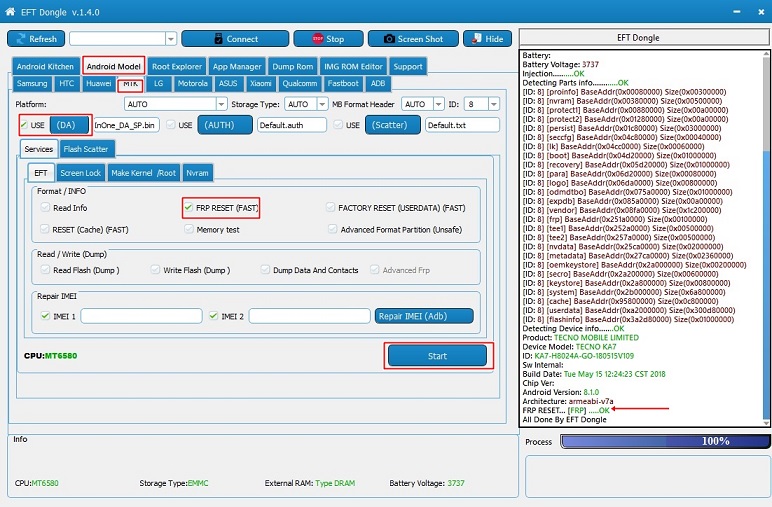
- Download the DA file and the EFT crack software and install. Follow this GUIDE to install the EFT crack.
- Launch the EFT 1.4.0 crack software.
- Click on the Android Model Tab.
- Select the MTK Tab.
- Tick the Use DA option and click on the DA Tab and select the DA file you downloaded for Tecno KA7.
- Now tick the FRP RESET(FAST) option.
- Switch OFF your phone and click on the Start Tab.
- Connect your phone and let it finish the process.
- Done!! Now switch ON your Phone without FRP lock!!!
- Enjoy.

Tecno Spark 2 Specs
Technical Specifications
Display
- Screen Size: 6.0″ (18:9)
- Screen Type: IPS LCD
- Resolution: 1440×720
Platform
- OS: Android 8.1 Oreo (Go Edition)
- Chipset: MediaTek MT6580WP
- CPU: Quad-Core 1.3GHz
Camera
- Primary: 13MP
- Secondary: 8MP
Memory
- Internal: 16GB, RAM: 1GB
- External: microSD, up to 32GB
Network
- Technology: 3G
- SIM: Dual SIM
Battery
- Battery Capacity: 3500mAh

