

Remove Realme 12 Pro+ 5G FRP with the TSM Tool Pro instantly. TSM Tool Pro FRP is a professional mobile repair/unlock software used mainly by technicians to remove Factory Reset Protection (FRP) on Android devices.
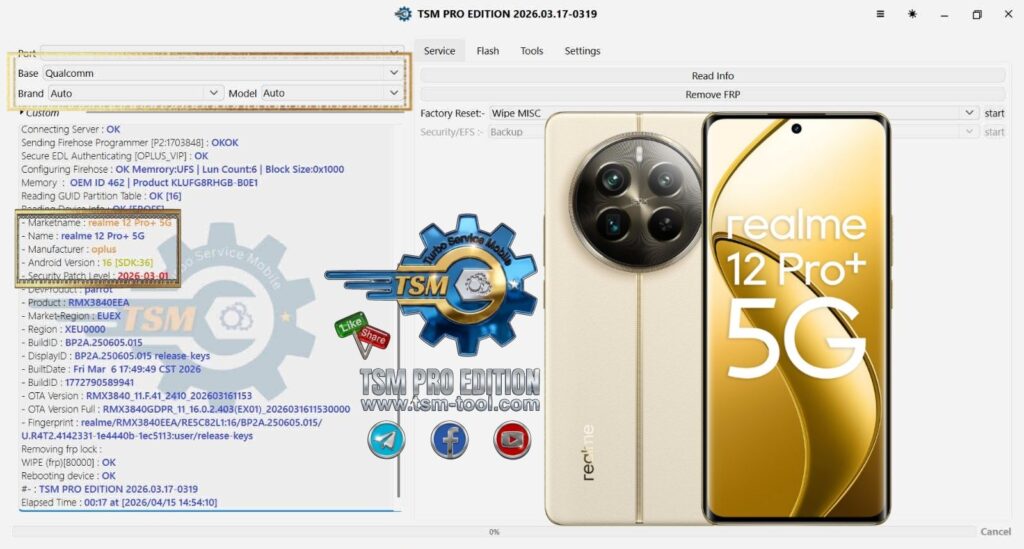
- MODEL: RMX3840
- ANDROID: 16
- PATCH: 2026-03-01
- CPU: Qualcomm
- MODE: EDL

TSM Tool Pro FRP does
- Removes Google FRP lock after factory reset
- Supports brands like Samsung, Tecno, Infinix, Itel, Xiaomi, Oppo, Vivo
- Works with chipsets: MediaTek (MTK), Qualcomm, Unisoc, Kirin
- Can also:
- Factory reset
- Remove screen locks
- Fix MDM / KG locks
- Flash firmware & read device info
FRP itself is a Google security feature that requires the previous account after reset to prevent theft.
steps:
- Install the TSM Tool on PC
- Connect phone (ADB / META / EDL mode)
- Select brand & model
- Click Remove FRP
- Wait for success


Tech GURU