



Here we are going to show you how to do Oppo IMEI repair if for some reason it shows Null or invalid. The steps we are going to show are ONLY for repairing the original IMEI of your phone and it’s not meant for criminal purposes!
NB: IT IS ILLEGAL TO CHANGE OR ALTER THE IMEI NUMBER OF ANY PHONE!!!
Oppo IMEI Repair
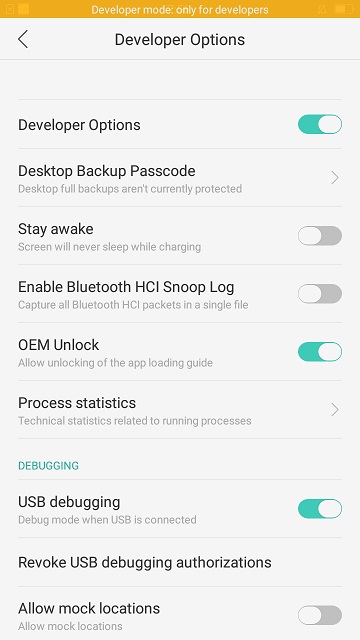
In this tutorial, we are going to use Miracle box software, your Oppo phone, and USB cable. First, make sure you have enabled developer options on your phone and enable USB debugging mode.

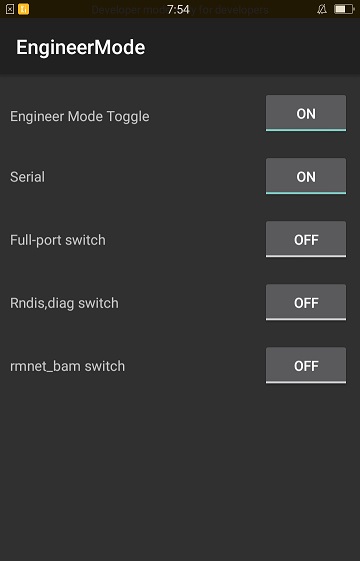
Then on your phone enter *#801#, you will be redirected to Engineer mode, here you will have to turn all the options.
READ ALSO: Samsung J200F FRP Lock Removal with Miracle Box

After you have done that then launch your Miracle box software and click the spd tab, then on your keyboard press and hold the CTRL & M keys to enable the IMEI repair option.
- Then click on the Qualcomm tab, select the repair option.
- Connect your phone while still turned ON.
- Scan the port and select the diagnostic option.
- Then select the repair security option down below and select Oppo new method on the dropdown list.
- Tick on the IMEI option and enter your IMEI number. Click start and the process should begin.
- After a successful operation, reboot your phone and check your IMEI number.
- Done!! The Oppo IMEI repair is OK.
Read also, X-TIGI 3307 Flash File Free Download


Tech GURU