Here we will show you the steps you will require for Nokia TA-1010 password unlocking and it’s 100% Tested by me. The steps are easy and it’s for Nokia 105 TA-1010 MT6261 chipset. To unlock this phone you will need the following :
- Miracle box software. Even crack will do.
- Nokia connectivity cable driver. Download Here.
- USB cable
- At least 30% of phone battery charge.
Nokia TA-1010 password Unlocking 100% Tested

Also download Nokia 105 TA-1010 flash file here for free
Steps for Nokia TA-1010 password Unlocking
NB: Make sure the phone is switched OFF
- Download the Nokia USB connectivity cable driver and install on your computer. If you already installed then skip this step.
- Launch Miracle box software.
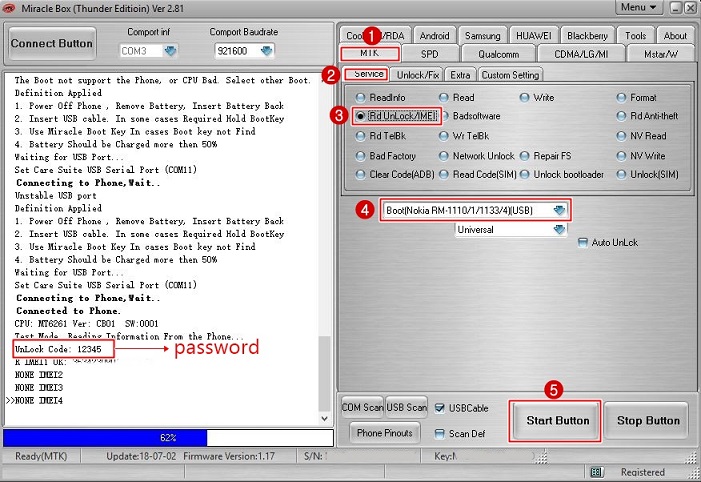
- On the user interface select MTK tab and then select the Service tab.
- From the list of options available select Rd Unlock/IMEI option.
- On the CPU type drop-down menu, choose Nokia RM-1110/1/1133/4. On other miracle models its boot 12th.
- Click the Start Button and Connect Nokia 105 TA-1010 your phone without holding any key.
- Once the phone is detected you will see the process starting. Do not disconnect until it finishes reading the password.
- When the process is done successfully, you will see the unlock code of your phone. Switch ON your phone and use that code to unlock your device.
- Done!!
Check the image below for more info.